Archiving and Deleting
Keep your workspace tidy without worrying about losing your work.
Almost everything in Scryla can be archived instead of deleted. Archiving removes an item from your active workspace while keeping it available for restoration later. If you eventually decide you no longer need it, you can permanently delete it from the archive.
This two-step process helps protect your work from accidental deletion.
Archiving items
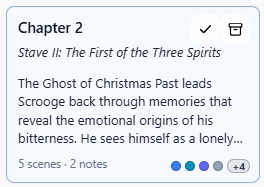
You can archive:
Projects
Series
Chapters
Scenes
Notes
Characters
Worldbuilding entries
Marketing items
Most other planning records
Archive controls appear throughout Scryla, including project cards, series cards and the footer of most editing windows.
Tip
If you can't find something you archived, check your Archive before assuming it has been deleted.
What happens when you archive something?
Archiving removes the item from your active workspace but keeps all of its information intact.
For example:
An archived chapter disappears from your manuscript but can be restored later.
An archived note is removed from your notes list.
An archived character disappears from active character lists.
An archived project is removed from your Projects page.
An archived series is removed from your Series page.
Nothing is permanently erased until you explicitly delete it from the archive.
Chapters and scenes
Chapters and scenes have slightly different behaviour.
Archiving a chapter
Archiving a chapter automatically archives every scene inside it.
This preserves the chapter exactly as it existed, making restoration simple if you change your mind later.
Archiving a scene
Archiving a scene only removes that individual scene from its chapter.
The rest of the chapter remains unchanged.
Restoring archived items
Every project contains its own Archive drawer.
From here you can:
browse archived items
restore them to your project
permanently delete items you no longer need
Restoring returns the item to its previous location wherever possible.
Archived projects and series
Projects and series use dedicated archive pages rather than the project archive drawer.
From these archive pages you can:
restore archived projects or series
permanently delete them
This keeps your main dashboard uncluttered while ensuring nothing is lost accidentally.
Permanently deleting items

Deleting permanently removes an item from Scryla.
Unlike archiving, permanent deletion cannot be undone.
To help protect your work:
project items cannot be deleted directly
they must first be archived
permanent deletion is only available from the Archive
This deliberate two-step process greatly reduces the chance of accidentally deleting months of planning with a single click.
Deleting projects and series
Projects and series can be deleted from their power menus without being archived first.
Because these actions affect an entire project or series, Scryla always displays a confirmation warning before continuing.
You'll be asked to confirm that you understand the deletion is permanent before the project or series is removed.
Important
Permanent deletion cannot be reversed. If you're unsure whether you'll need something again, archive it instead.
Only permanently delete something when you're confident you'll never need it again.
This approach keeps your workspace clean while giving you the peace of mind that your work is still there if you change your mind.