Creating "Favorite" Projects
Favorites help you keep your most important projects within easy reach. When you mark a project as a favorite, Scryla moves it to the beginning of your project list without removing it from the main workspace.
This is useful for a novel you are actively drafting, a project approaching its deadline, or any book you open regularly.
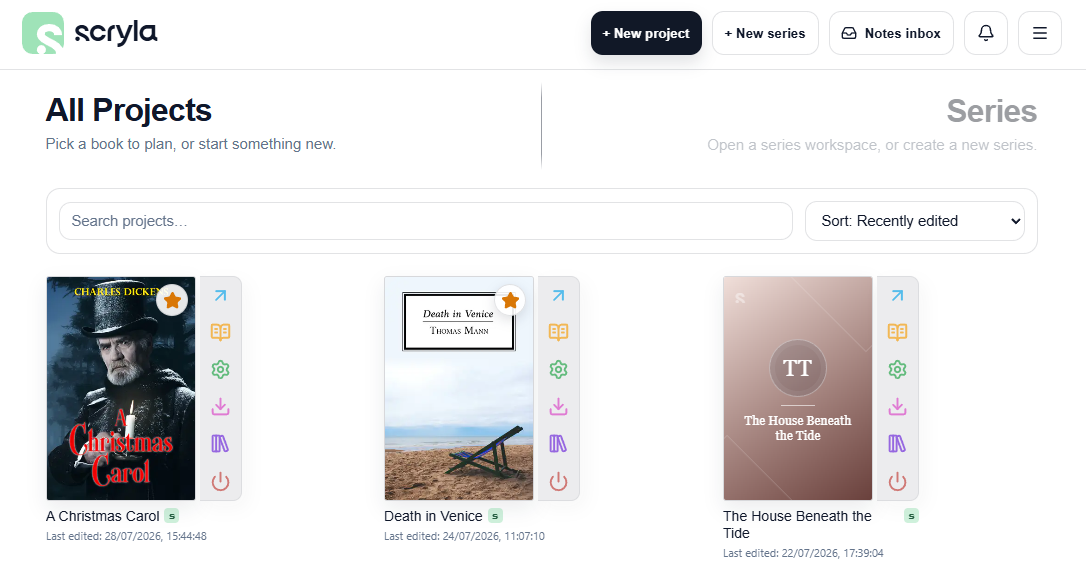
Add a Project to Your Favorites
From All Projects:
Find the project you want to favorite.
Select the star on the project cover.
The star becomes highlighted, and the project moves to the beginning of the list.
You can favorite as many projects as you need. All favorites remain part of the same project list; Scryla simply places them ahead of your other projects.
Remove a Project from Your Favorites
To remove a favorite:
Find the project in your project list.
Select the highlighted star on its cover.
The project returns to its normal position according to your current sorting option.
Removing a project from your favorites does not delete, archive, or otherwise change it. It only removes its priority in the list.
Favorites and Sorting
Favorite projects always appear before non-favorite projects. Within those groups, Scryla continues to follow your selected sorting option, such as Recently edited.
This gives you a predictable workspace: the projects you have chosen to prioritize stay at the front, while the rest remain organized according to your preferred sort order.
How To Use Favorites
Favorites work best as a small, intentional set rather than a second project library. Consider using them for:
Your current primary manuscript
A project in active revision
A book with an approaching deadline
A reference project you open frequently
When a project is no longer part of your immediate focus, remove the favorite to keep the beginning of your workspace clear.
Note
Favorites are currently available for individual projects. Support for favoriting series is planned for a future release.